A sample case of data querying
After understanding the basics, you may want to see an approach for querying a specific set. In this article, we take a look at how to use the package to determine and query for data in Alaska.
What we’re looking for
We want to work with ozone concentrations in Alaska. In particular, we’re looking to get data for the entire month of January in 2019. We might be able to see how to make the call easier by setting up these requirements as a bulleted list:
- Start data = January 1, 2019
- End date = January 31, 2019
- Pollutant = ozone
- State = Alaska
What service to use
The EPA contains several services so we need to first determine what service to use to get these data.
Since we’re looking for data for a month, it might make sense to check out the daily summary services.
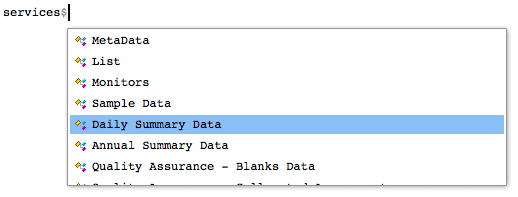
services$`Daily Summary Data`$Description## [1] "Returns data summarized at the daily level. All daily summaries are calculated on midnight to midnight basis inlocal time. Variables returned include date, mean value, maximum value, etc."The endpoint for the service
If we want to try using the daily summary service, we need to find an endpoint for it as well as the API variables to fill.
The services object gives us the answer. We can easily select the Daily Summary Data option and subsequently find what endpoint we need to filter by state.
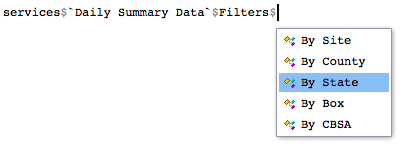
services$`Daily Summary Data`$Filters$`By State`## $Endpoint
## [1] "dailyData/byState"
##
## $RequiredVariables
## [1] "email, key, param, bdate, edate, state"
##
## $OptionalVariables
## [1] "cbdate,cedate"
##
## $Example
## [1] "Example; returns all benzene daily summaries from North Carolina collected on May 15th, 1995:https://aqs.epa.gov/data/api/dailyData/byState?email=test@aqs.api&key=test¶m=45201&bdate=19950515&edate=19950515&state=37"We can see the endpoint and the API variables we need here. Recall that we don’t need to include an email and key since the package already includes authentication credentials.
We can use the variables object to find appropriate codes to use for each variable.
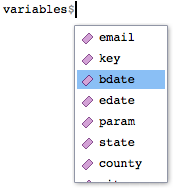
variables$bdate## [1] "bdate"
## [2] "The begin date of the data selection in YYYYMMDD format. Only data on or after this date will be returned. (Note, for annual data, only the year portion of the bdate and edate are used and only whole years of data are returned. For example, bdate = 20171231 and edate = 20180101 will return full data for 2017 and 2018.)"
## [3] "20170101"This tells us bdate should be in a YYYYMMDD format. A similar process also tells us that edate should follow the same YYYYMMDD format.
No we can move on to finding parameter codes for the state of Alaska and for ozone.
Finding codes for API variables
We need to find the parameter code for Alaska. How might we do this? A service in the API might help us here.
services$List$Description## [1] "Provides information you need to construct other queries. Valid values for the required variables: parameter code, state code, etc. (See below.)"Indeed, the list service description seems to fit our needs.
The state code
After tooling around the filters, it looks like the States filter would give us the info we need to get state parameter codes.
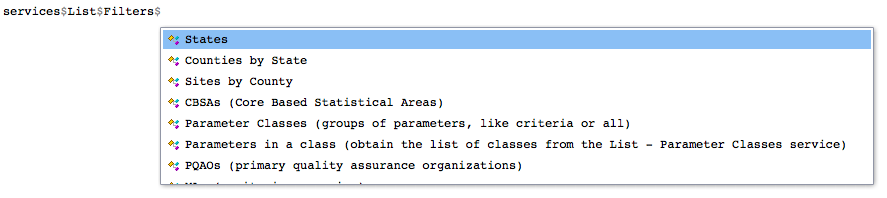
services$List$Filters$States## $Endpoint
## [1] "list/states"
##
## $RequiredVariables
## [1] "email, key"
##
## $OptionalVariables
## [1] ""
##
## $Example
## [1] "Returns a list of the states and their FIPS codes used for constructing other requests:https://aqs.epa.gov/data/api/list/states?email=test@aqs.api&key=test"It looks like we need only use the endpoint suggested to get the state codes.
endpoint <- services$List$Filters$States$Endpoint
state.codes <- perform.call(endpoint)
head(state.codes$Data)
## code value_represented
## 1 01 Alabama
## 2 02 Alaska
## 3 04 Arizona
## 4 05 Arkansas
## 5 06 California
## 6 08 ColoradoAlaska shows up as 02 so we can now set that API variable up in our call.
The parameter code
Now, we’re left with determining the parameter code for ozone. We check out the variables object to get more info.
variables$param## [1] "param"
## [2] "The AQS parameter code for the data selection. AQS uses proprietary 5 digit codes. They may be obtained via the list parameters service. Up to 5 parameters may be requested, separated by commas. Only data for these parameters will be returned."
## [3] "81101,44201"It looks like we will be using a 5 digit code, but we should use the List service to find out more. We can start by looking at what parameter groups exist.
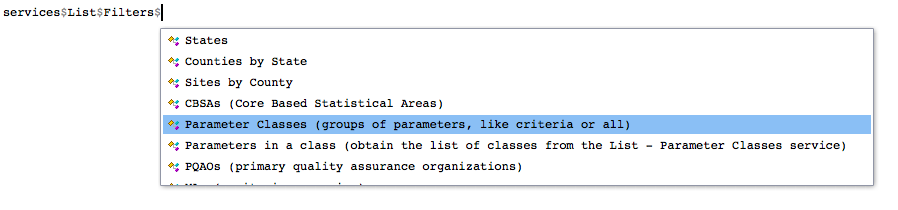
Using the endpoint for this filter, we see what pollutants are available.
endpoint <- services$List$Filters$`Parameter Classes (groups of parameters, like criteria or all)`$Endpoint
result <- perform.call(endpoint)
head(result$Data)
## code
## 1 AIRNOW MAPS
## 2 ALL
## 3 AQI POLLUTANTS
## 4 CORE_HAPS
## 5 CRITERIA
## 6 CSN DART
## value_represented
## 1 The parameters represented on AirNow maps (88101, 88502, and 44201)
## 2 Select all Parameters Available
## 3 Pollutants that have an AQI Defined
## 4 Urban Air Toxic Pollutants
## 5 Criteria Pollutants
## 6 List of CSN speciation parameters to populate the STI DART toolIt looks like several types of parameters exist. Since we’re looking for ozone, and ozone is a pollutant we’ll try looking at AQI POLLUTANTS. Now that if we want to search the AQI POLLUTANTS class of pollutants for ozone, we have to use a different service.
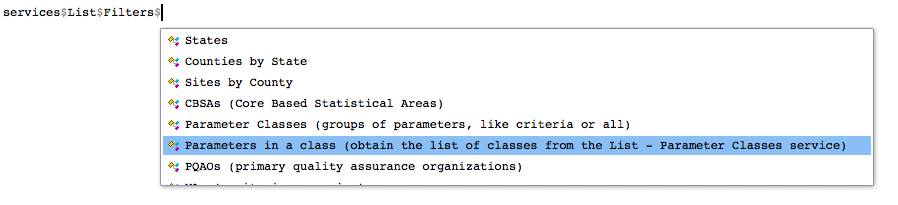
services$List$Filter$`Parameters in a class (obtain the list of classes from the List - Parameter Classes service)`## $Endpoint
## [1] "list/parametersByClass"
##
## $RequiredVariables
## [1] "email, key, class"
##
## $OptionalVariables
## [1] ""
##
## $Example
## [1] "Example; returns all parameters in the CRITERIA class:https://aqs.epa.gov/data/api/list/parametersByClass?email=test@aqs.api&key=test&pc=CRITERIA"Notice that the example requires specifying the parameter class as pc. Now we can search for the ozone parameter code within AQI POLLUTANTS. We see the endpoint first:
services$List$Filters$`Parameters in a class (obtain the list of classes from the List - Parameter Classes service)`$Endpoint## [1] "list/parametersByClass"endpoint <- "list/parametersByClass"
parameters <- "AQI POLLUTANTS"
result <- perform.call(endpoint, parameters, "pc")
result$Data## code value_represented
## 1 42101 Carbon monoxide
## 2 42401 Sulfur dioxide
## 3 42602 Nitrogen dioxide (NO2)
## 4 44201 Ozone
## 5 81102 PM10 Total 0-10um STP
## 6 88101 PM2.5 - Local Conditions
## 7 88502 Acceptable PM2.5 AQI & Speciation MassBingo. Ozone has a code of 44201 so we can declare an API variable for our original query.
Putting it all together
Recall that we set out to find data for the following:
- Start data = January 1, 2019
- End date = January 31, 2019
- Pollutant = ozone
- State = Alaska
We determined the endpoint and parameter codes to use for each value. Here we setup our API variables based on our findings.
endpoint <- "dailyData/byState"
vars <-  list(bdate = "20190101",
              edate = "20190131",
              param = "44201",    # Ozone
              state = "02")       # Alaska
We set up a variables list and make the call. The order variables go in the list doesn’t matter.
alaska <- perform.call(endpoint, vars)We can check the data is present as called.
alaska <- alaska$Data
head(alaska)
## state_code county_code site_number parameter_code poc latitude longitude
## 1 02 068 0003 44201 1 63.7232 -148.9676
## 2 02 068 0003 44201 1 63.7232 -148.9676
## 3 02 068 0003 44201 1 63.7232 -148.9676
## 4 02 068 0003 44201 1 63.7232 -148.9676
## 5 02 068 0003 44201 1 63.7232 -148.9676
## 6 02 068 0003 44201 1 63.7232 -148.9676
## datum parameter sample_duration pollutant_standard date_local
## 1 WGS84 Ozone 1 HOUR Ozone 1-hour 1979 2019-01-01
## 2 WGS84 Ozone 8-HR RUN AVG BEGIN HOUR Ozone 8-Hour 1997 2019-01-01
## 3 WGS84 Ozone 8-HR RUN AVG BEGIN HOUR Ozone 8-Hour 2008 2019-01-01
## 4 WGS84 Ozone 8-HR RUN AVG BEGIN HOUR Ozone 8-hour 2015 2019-01-01
## 5 WGS84 Ozone 1 HOUR Ozone 1-hour 1979 2019-01-02
## 6 WGS84 Ozone 8-HR RUN AVG BEGIN HOUR Ozone 8-Hour 1997 2019-01-02
## units_of_measure event_type observation_count observation_percent
## 1 Parts per million None 24 100
## 2 Parts per million None 24 100
## 3 Parts per million None 24 100
## 4 Parts per million None 17 100
## 5 Parts per million None 24 100
## 6 Parts per million None 24 100
## validity_indicator arithmetic_mean first_max_value first_max_hour aqi
## 1 Y 0.042667 0.045 9 NA
## 2 Y 0.041917 0.044 5 41
## 3 Y 0.041917 0.044 5 41
## 4 Y 0.041588 0.044 7 41
## 5 Y 0.036708 0.040 1 NA
## 6 Y 0.035708 0.039 0 36
## method_code method local_site_name
## 1 047 INSTRUMENTAL - ULTRA VIOLET Denali NP & PRES - Headquarters
## 2 047 INSTRUMENTAL - ULTRA VIOLET Denali NP & PRES - Headquarters
## 3 047 INSTRUMENTAL - ULTRA VIOLET Denali NP & PRES - Headquarters
## 4 047 INSTRUMENTAL - ULTRA VIOLET Denali NP & PRES - Headquarters
## 5 047 INSTRUMENTAL - ULTRA VIOLET Denali NP & PRES - Headquarters
## 6 047 INSTRUMENTAL - ULTRA VIOLET Denali NP & PRES - Headquarters
## site_address state county city cbsa_code cbsa
## 1 DENALI NATIONAL PARK Alaska Denali Not in a city <NA> <NA>
## 2 DENALI NATIONAL PARK Alaska Denali Not in a city <NA> <NA>
## 3 DENALI NATIONAL PARK Alaska Denali Not in a city <NA> <NA>
## 4 DENALI NATIONAL PARK Alaska Denali Not in a city <NA> <NA>
## 5 DENALI NATIONAL PARK Alaska Denali Not in a city <NA> <NA>
## 6 DENALI NATIONAL PARK Alaska Denali Not in a city <NA> <NA>
## date_of_last_change
## 1 2020-02-26
## 2 2020-02-26
## 3 2020-02-26
## 4 2020-02-26
## 5 2020-02-26
## 6 2020-02-26